Cyber News
Google Chrome Adds ClickFix Warnings to Stop Users From Running Malicious Commands
Category: Web Attacks Secondary Categories: Phishing & Social Engineering, Browser Security, Malware Delivery
6 min read
Category: Supply Chain Attacks Secondary Categories: WordPress Security, Credential Attacks, Web Application Attacks
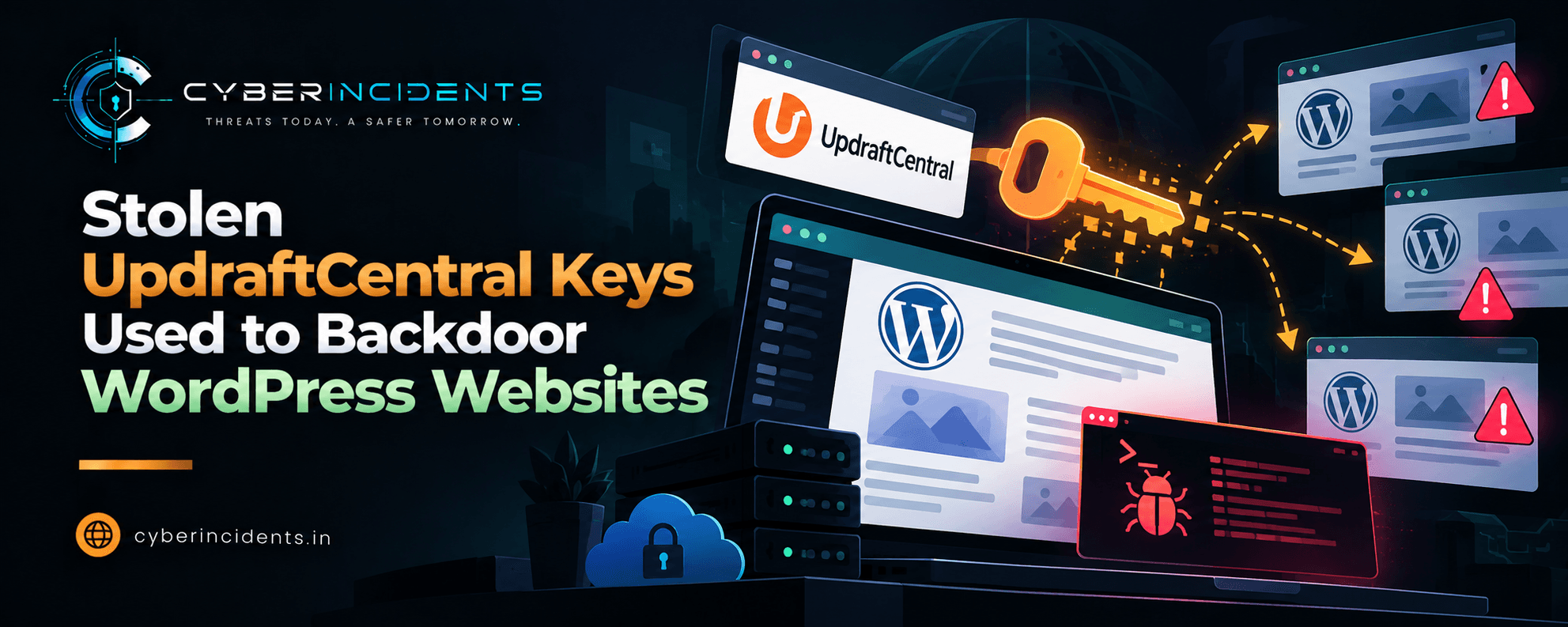
TeamUpdraft, the developer of the widely used UpdraftPlus WordPress backup plugin, disclosed unauthorized access to its website over the weekend of October 17–18, 2026. The incident potentially exposed customer information, password hashes, two-factor authentication settings, and connection keys used by UpdraftCentral, UpdraftVault, and UpdraftClone.
Security researchers subsequently observed attackers abusing valid UpdraftCentral dashboard keys to install malicious plugins on connected WordPress websites. These plugins could establish unauthorized access and create privileged accounts, allowing attackers to maintain persistence even after a malicious plugin was removed.
The incident demonstrates how compromising a trusted remote-management service can provide attackers with access to multiple downstream websites without exploiting each site's server directly.
Key takeaway: WordPress administrators should revoke affected connection keys, inspect administrator accounts and plugins, update UpdraftPlus, and investigate suspicious activity dating from October 18, 2026, at 15:32 UTC.
TeamUpdraft identified unauthorized access to its website, teamupdraft.com, during October 17–18, 2026. The company stated that the attacker may have accessed its customer database, including account details, billing information, order history, password hashes, two-factor authentication settings, and service connection keys.
The company said payment-card information was not stored in the affected database. It also clarified that the UpdraftPlus plugin files and downloads, self-hosted UpdraftCentral instances, and customer backups stored in their own remote storage were not reported as compromised.
However, exposed remote-management keys created a separate risk. UpdraftCentral allows administrators to manage connected WordPress websites remotely, meaning a valid key could potentially authorize commands against linked sites.
Researchers from Patchstack and Nethemba reported attackers using valid UpdraftCentral dashboard keys to send signed plugin.upload_plugin commands through the remote procedure call (RPC) channel.
The reported attack chain was:
Access to valid keys: Attackers obtained or abused affected UpdraftCentral connection keys.
Remote command execution: Signed commands were sent to connected WordPress sites through the plugin's RPC mechanism.
Malicious plugin installation: WordPress's standard plugin installer installed and activated attacker-supplied plugins.
Unauthorized account creation: The backdoor could create accounts with elevated capabilities or interact with existing administrator accounts.
Persistence: A created account could remain active after the malicious plugin was removed, depending on the backdoor variant and account permissions.
The malicious plugins were disguised as routine maintenance, site-health, optimization, and content-management tools. Researchers identified numerous distinct plugin names, making detection based on a single filename insufficient.
The attack exploited trust in a legitimate remote-management channel rather than necessarily exploiting a vulnerability on every targeted website. A site could be running a current WordPress version and still be exposed if it retained an affected cloud UpdraftCentral connection key.
Nethemba reported that three of its websites were targeted and that malicious plugins were successfully installed on two. Researchers also documented a backdoor variant that checked incoming requests for a specific URL parameter and used a token to trigger unauthorized account-related actions.
A particularly important finding was that removing the malicious plugin alone might not remove accounts created by the backdoor. Investigators must therefore examine both the filesystem and WordPress user records, as well as review authentication and administrative activity.
TeamUpdraft reported closing the access route, signing out accounts, and replacing potentially affected keys and credentials. It released UpdraftPlus versions 1.26.13 (Free) and 2.26.13 (Premium) to disconnect affected older cloud connections.
Administrators should verify the current vendor guidance before remediation and confirm that all relevant connection keys have actually been removed. Updating the plugin alone should not be treated as proof that a website is clean.
TeamUpdraft advisory: https://teamupdraft.com/
Patchstack: https://patchstack.com/
Nethemba: https://nethemba.com/
Wordfence: https://www.wordfence.com/
These are the relevant organizations' websites; consult their incident-specific advisories and technical analyses for the latest details.
The following indicators were listed in the supplied incident report. They should be treated as investigation leads, not proof of compromise in isolation.
| Type | Indicator |
|---|---|
| IPv4 | 43.250.53.42 |
| IPv6 | 2a09:bac5:4e21:2e3c::49b:9 |
Search web-server, WAF, firewall, proxy, and network telemetry for these addresses. Establish the direction, timestamp, and context of each connection before attributing activity to the incident.
The report identifies these names as examples of malicious backdoor plugins:
Site Health Cache
Site Health 364F
Asset Forge 2
Content Helper
Wp Forge
Query Shelf
Style Bridge 8F5
Media Kit 183
Post Dock 776
Nav Hub
Speed Desk
Speed Kit 300
Link Latch
Script Shelf
Feed Case
These are not necessarily the complete set: researchers reportedly observed 99 distinct plugin names. Validate each finding against the site's legitimate plugin inventory and file contents.
| Account name | Additional attributes to check |
|---|---|
system_team850 | Unexpected @example.com email or display name such as System Team |
web.tech988 | Unexpected @example.com email or display name such as Web Tech |
cmseditor170 | Unexpected @example.com email or display name such as System Staff |
cms.tech644 | Unexpected @example.com email or display name such as System Ops |
web_mgr684 | Unexpected @example.com email or display name such as Cms Tech |
The report also describes a backdoor variant that created an account named data-ops43, with the display name Site Tools, and an Editor role augmented with capabilities such as manage_options and install_plugins.
Do not rely only on usernames: inspect account IDs, email addresses, roles, capabilities, creation times, and authentication history.
Reported attack start: October 18, 2026, at 15:32 UTC.
RPC command: plugin.upload_plugin
Related command: plugin.delete_plugin
URL parameter reported in one backdoor variant: ?_9f5696=
Plugin source marker: Small maintenance toolkit: keeps option storage tidy.
Search for these strings where applicable, but note that attackers can change filenames, parameters, and source-code markers between variants.
Build an inventory of WordPress sites that have or had:
UpdraftPlus Free or Premium installed and active.
A connection to TeamUpdraft's cloud-hosted UpdraftCentral service.
An affected or previously configured connection key during the incident window.
Prioritize internet-facing sites, business-critical WordPress installations, and sites where the same administrator credentials are reused.
Collect plugin inventories, file creation and modification events, web-server logs, WordPress audit logs, and endpoint telemetry where available.
Look for:
Unknown plugins installed or activated after October 18, 2026, at 15:32 UTC.
Plugin directories created shortly before suspicious account creation.
PHP files that do not match trusted plugin packages.
Unexpected changes to plugin code or WordPress core files.
Plugins with maintenance-themed names but unexplained privileged functionality.
Compare suspicious files with trusted vendor packages and known-good backups. Filename matching alone is not sufficient.
Review WordPress user records and available audit logs for new accounts, role changes, capability changes, and administrator logins.
Prioritize accounts that:
Were created during or shortly after suspicious plugin installation.
Have unusual email addresses or display names.
Possess manage_options, install_plugins, or other unexpected capabilities.
Continue to exist after a suspicious plugin was removed.
Authenticate from unusual IP addresses or outside expected maintenance windows.
Also check whether an account that appears to be an Editor has been granted capabilities beyond the normal role.
Search web-server access logs, WAF logs, reverse-proxy logs, and application audit trails for:
Requests to the site root using POST where the request is associated with the UpdraftCentral RPC channel.
Evidence of plugin.upload_plugin or plugin.delete_plugin commands in application-level logs.
Requests containing ?_9f5696=.
Connections involving the listed IPv4 or IPv6 addresses.
Administrative logins, plugin changes, or account creation immediately after suspicious requests.
A POST request to the site root is not malicious by itself. Correlate it with application behavior, source IP, authentication context, plugin changes, and subsequent account activity.
If suspicious activity is found:
Preserve relevant logs and copies of suspicious files.
Inspect active plugins, must-use plugins, themes, scheduled tasks, and other persistence locations.
Review administrator accounts and capabilities directly in the WordPress database or trusted administrative tooling.
Check for unexpected PHP execution, modified site content, and suspicious outbound connections.
Determine whether credentials, database secrets, API tokens, or remote-storage credentials accessible to the site may have been exposed.
SOC assessment: A confirmed malicious plugin installation combined with an unexplained privileged account or unauthorized UpdraftCentral command should be escalated as a potential site compromise, not treated as an isolated plugin alert.
The following rules are starting points for hunting. They require the relevant logs to contain the fields shown and may need adaptation to your SIEM, web-server format, and Sigma backend. They do not establish that a request is malicious on their own.
This rule hunts for requests containing known URL and command indicators. It is most useful when the web-server logging pipeline captures request URIs and relevant request content. Many standard access logs do not record POST bodies or RPC command names.
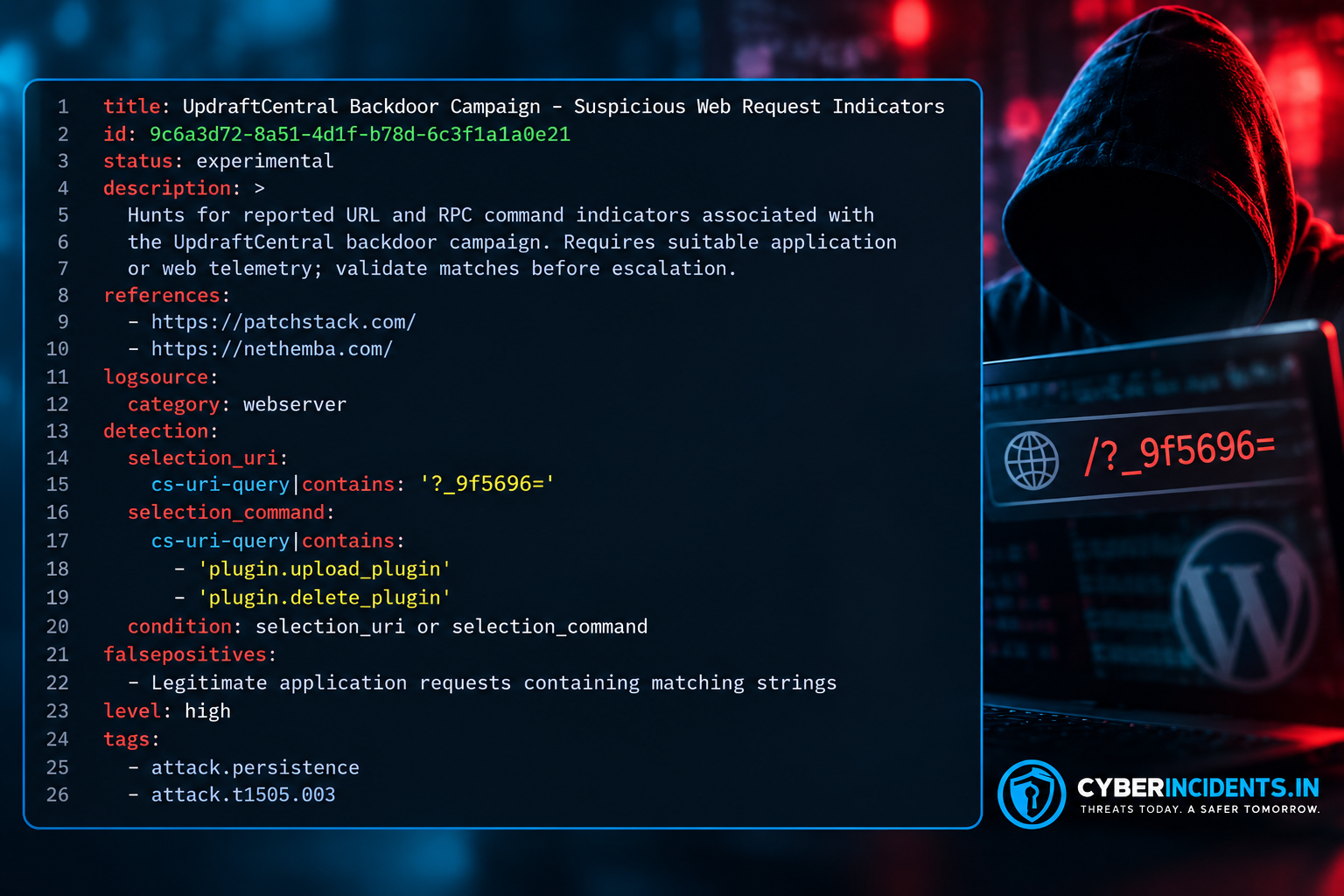
Limitations: Field names such as cs-uri-query are not universal. Adapt them to your web-server schema. If the RPC command is carried in a POST body rather than the URL, collect application-level request telemetry and map the body field appropriately. Do not enable sensitive body logging without considering secrets and privacy.
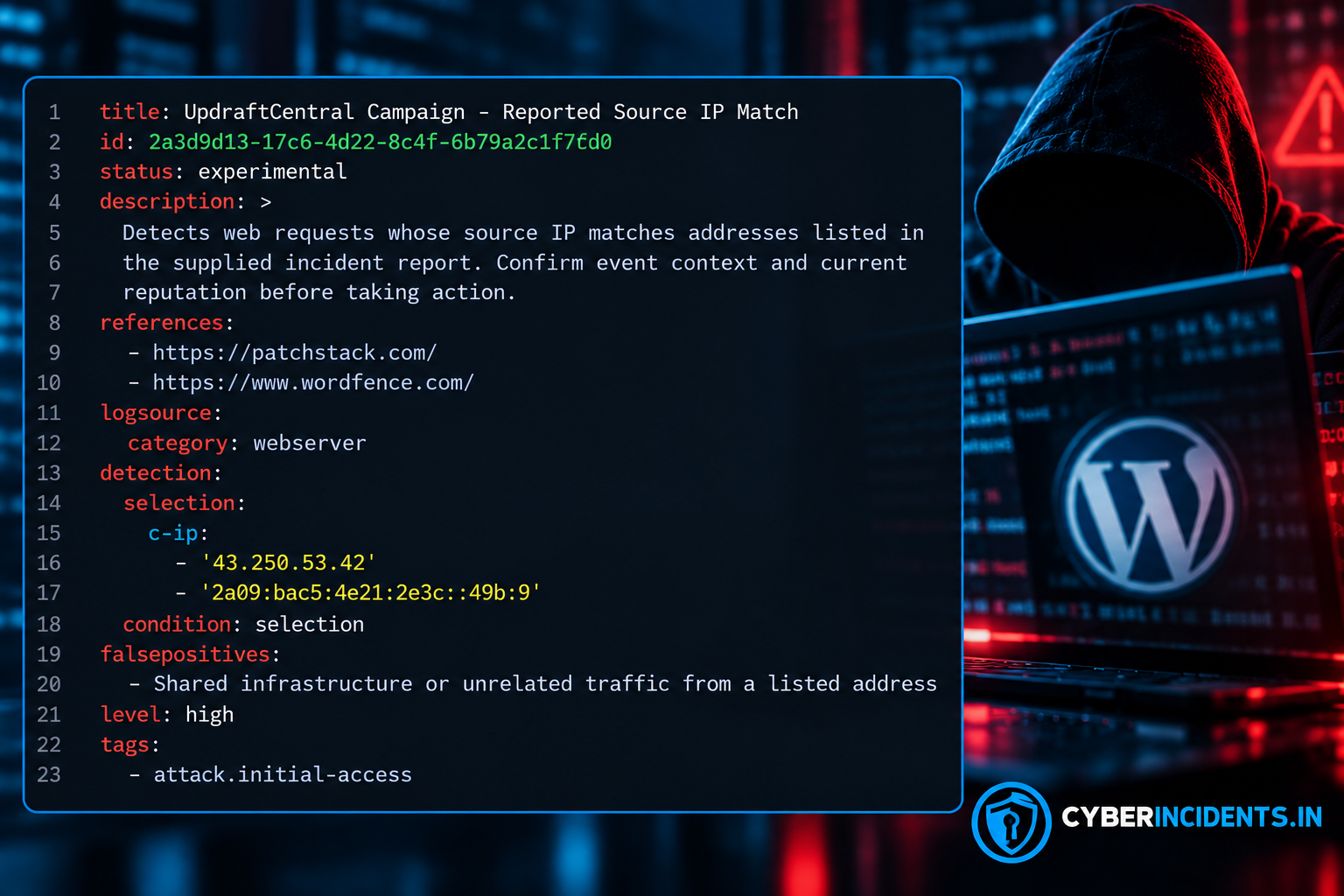
Limitations: c-ip is a placeholder commonly associated with some web-server log formats. Map it to the actual client IP field in your telemetry. Ensure proxy and load-balancer configurations preserve the trustworthy original client IP; do not blindly trust a client-supplied forwarding header.
Web-server logs alone may not reveal plugin installation, account creation, or privilege changes. For stronger coverage, forward WordPress audit events and filesystem monitoring into your SIEM, then create separate detections for:
New administrator accounts and unexpected capability grants.
Installation or activation of plugins outside approved change windows.
Changes to PHP files under plugin directories.
Administrative authentication following suspicious RPC activity.
The incident report does not provide a complete set of raw event records or a universal WordPress audit-log schema, so those detections must be mapped to the telemetry available in your environment.
Update UpdraftPlus: Install a vendor-supported version at least as recent as Free 1.26.13 or Premium 2.26.13, and verify the currently recommended release.
Disconnect affected cloud connections: Sign in through each site's own WordPress dashboard and remove affected UpdraftCentral connection keys using the vendor's documented procedure.
Inspect users and plugins: Review normal and must-use plugins, administrator accounts, role assignments, and unexpected capabilities.
Rotate credentials: Change WordPress administrator passwords, TeamUpdraft account passwords, and relevant remote-storage credentials. Reset 2FA where indicated by vendor guidance.
Reauthorize integrations: Reconnect affected UpdraftCentral, UpdraftVault, or UpdraftClone services using newly issued credentials and keys as applicable.
Preserve evidence: Save relevant logs, suspicious files, timestamps, and account details before removing artifacts where incident investigation is required.
Recover carefully: If compromise is confirmed, consider restoring from a verified clean backup taken before October 17, 2026. Investigate accounts and credentials separately, because restoring files alone may not eliminate every persistence mechanism.
Use unique, phishing-resistant MFA for privileged accounts where supported.
Restrict access to WordPress administration and remote-management services.
Maintain an approved plugin inventory and alert on unauthorized plugin installation or activation.
Monitor administrator creation, role changes, plugin filesystem changes, and unusual outbound connections.
Keep offline or independently protected backups and regularly test restoration.
Avoid reusing passwords between WordPress, hosting, and vendor accounts.
Treat unexpected emails about the incident, password resets, or key replacement as potential phishing attempts.
The UpdraftCentral incident highlights the risk created when trusted remote-management credentials are compromised. A valid management key can provide an attacker with a route into connected websites, while a malicious plugin may establish persistence beyond the initial installation.
Organizations should combine credential and key rotation with targeted threat hunting across WordPress accounts, plugin files, application requests, and authentication records. Updating the plugin is essential, but it is not a substitute for investigating whether the site was already compromised.
Continue reading
Cyber News
Category: Web Attacks Secondary Categories: Phishing & Social Engineering, Browser Security, Malware Delivery
Cyber News
Category: Cloud Attacks Secondary Categories: Supply Chain Attacks, Identity & Credential Attacks
Cyber News
Cybercriminals are impersonating popular AI platforms such as ChatGPT, Claude, Google Gemini, and GitHub Copilot to trick employees into executing malicious commands, downloading m...
3 entries, most recent posts.
Category: Web Attacks Secondary Categories: Phishing & Social Engineering, Browser Security, Malware Delivery
Category: Cloud Attacks Secondary Categories: Supply Chain Attacks, Identity & Credential Attacks
Cybercriminals are impersonating popular AI platforms such as ChatGPT, Claude, Google Gemini, and GitHub Copilot to trick employees into executing mal...